
How to install ESP8266 Deauther (.bin)

Want to build an ESP8266 Deauther? Here is the official installation guide using .bin files. This installation method is the easiest. But if you're looking to modify the code, follow the Arduino IDE tutorial.
About the Project
The ESP8266 Deauther is a popular open-source pen-testing tool. You can test your own WiFi network against the common denial-of-service vulnerability called deauthentication attack. You can also use it to create the appearance of a lot of WiFi networks that are not really there to learn and experiment with WiFi.
And the best part, all you need is an ESP8266! Not sure which one to get? We made a post about development boards we recommend: Recommended Dev-Boards for Deauther
Installation Steps
Get a .bin file for your board from deauther.com
Open esp.huhn.me in Chrome, or another supported browser
Connect your ESP8266 board via USB
Click Connect and select the serial port of your ESP
Select your Deauther .bin file
Click Program
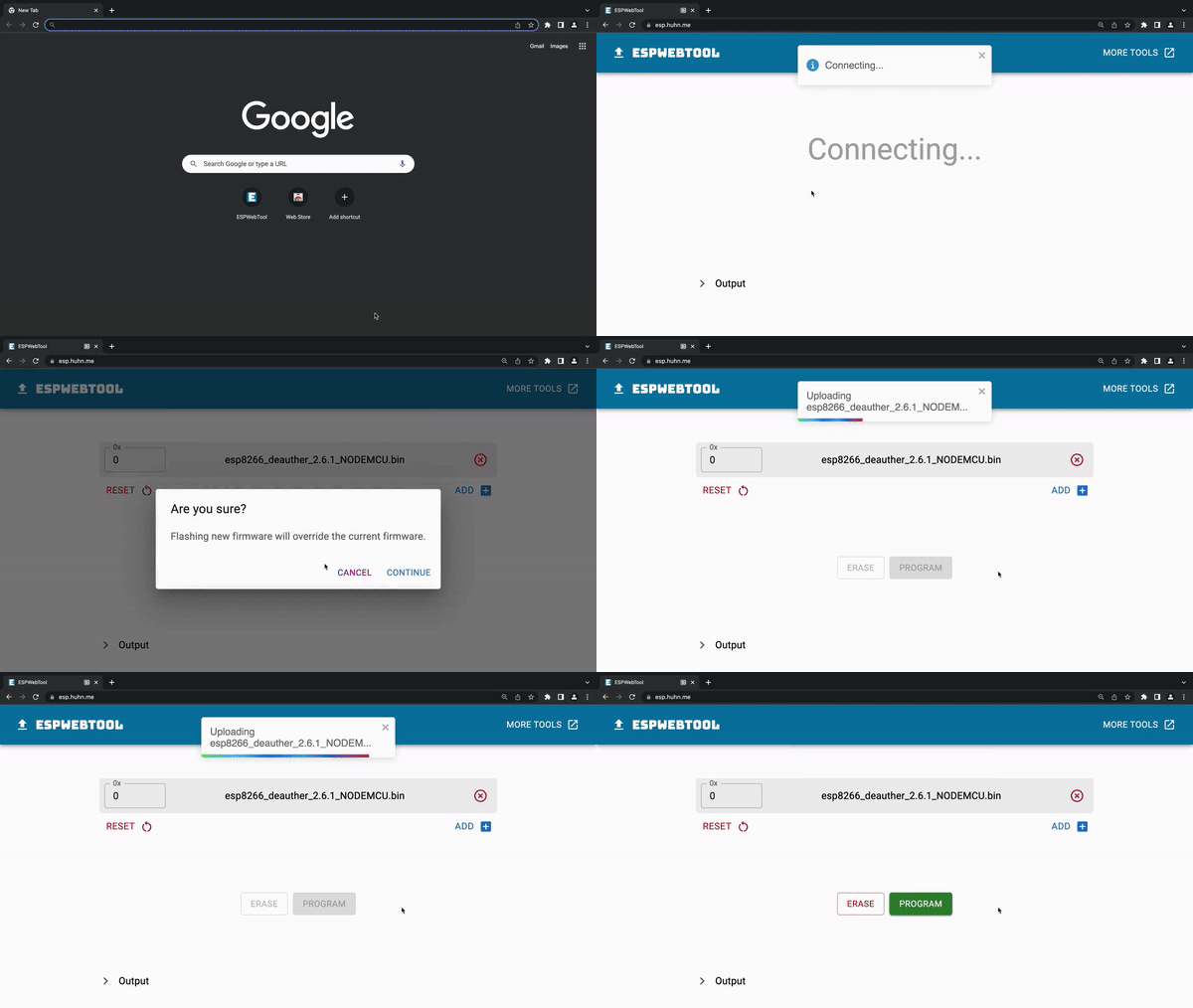
Finding the correct port
If you don't know which serial port to select, click connect on esp.huhn.me and then plug in your board. Whatever port pops up in the list is what you're looking for.
You should check the cable and USB port if no new port pops up. Some USB cables are only for charging and cannot transmit data.
Or maybe you're missing the drivers for your device:
🔗 CH340/CH341 Drivers: http://www.wch-ic.com/downloads/CH341SER_ZIP.html
🔗 CP210x Drivers: https://www.silabs.com/developers/usb-to-uart-bridge-vcp-drivers
🔗 FTDI Drivers: https://ftdichip.com/drivers/
Connection failed?
Make sure to set the baud rate to 115200 in the settings. Higher baud rates allow faster upload speeds but can also introduce connection issues.
If that doesn't help, check out this blog post about common ESP8266 and ESP32 errors: https://blog.spacehuhn.com/espcomm/
And if you run into other issues, try using a different flashing tool/method.
Alternatives
My ESP web tool is not the only software you can use to flash your ESP8266:
And if you're looking for something Deauther-specific, check out n2d: https://github.com/realmrvodka/n2d/
Getting started with ESP8266 Deauther
Now that you installed the Deauther firmware visit deauther.com to learn more about the tool and how to use it.


